Tennant T16 & T12 Fault Codes Guides
Alpha Power Cleaners are Tennant-authorised partners operating across the East Midlands. We supply a range of Tennant cleaning machines for hire, including floor scrubber dryers and floor sweepers.
Among our range are the Tennant T16 and Tennant T12.
Jump to Fault Codes:
Tennant T16 Floor Scrubber Dryer
The Tennant T16 is a battery-powered ride-on scrubber dryer built with a robust machine body and featuring innovative technology. As an all-round machine, the Tennant T12 can be used indoors and outdoors on concrete, hard floors and tiles. It is an ideal unit for shopping centres and warehouses, and operates quietly so that you can clean while others work nearby.
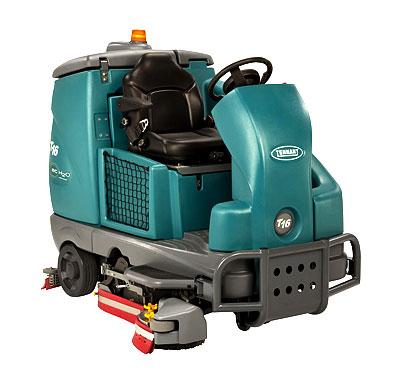
If you want a quote to hire the Tennant T16, give us a call on 0808 169 8529 today.
See the T16 product page for a full description and technical details.
Tennant T12 Floor Scrubber Dryer
The Tennant T12 is another powerful all-round, battery-powered floor scrubber dryer suitable for indoor and outdoor applications. The T12 is a compact unit, making it easy to manoeuvre and ideal for cleaning tighter spaces. Suitable for use on concrete and hard floors, the Tennant T12 can be used in supermarkets, shopping centres, retail, stadiums and more.
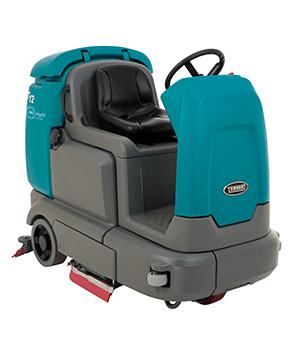
If you want a quote to hire the Tennant T12, give us a call on 0808 169 8529 today.
See the T12 product page for a full description and technical details.
As well as supplying a range of Tennant machines, we also provide a specialist repair and maintenance package to resolve any issues that might occur.
Don’t worry if your machine has suffered a fault. Our team can identify and resolve the issue using the unique fault code as guidance. Fault codes are a series of numbers and letters that indicate the type of fault that has occurred in your unit.
Use the full list of fault codes below to determine why your Tennant machine is malfunctioning, along with the recommended remedy.
It’s important to note that the T16 and T12 have 2 sets of codes, they have Fault Codes and Warning Codes.
Tennant T16 Floor Scrubber Dryer – Fault Codes
* If a fault code still appears, stop using the machine and contact us for help.
| Fault Code | Causes | Remedy |
|---|---|---|
| F1: Rec Tank Full | Recovery tank is full | Empty the recovery tank. |
| F2: Sol Tank Empty | Solution tank is empty | Fill the solution tank. |
| F3: Vac # Fit # | Vacuum fan motor(s) not operating | Turn off and restart the machine. |
| F4: Batt Very Low | Low battery charge | Recharge the machine. |
| F5: Propel Error | The propel controller has an error | Turn off and restart the machine. |
| F6: Left Br Flt # | Left brush not operating | Turn off and restart the machine.
Check the right brush for damage or debris. |
| F6: Frnt Br Flt# | Front brush not operating | Turn off and restart the machine.
Check the front brush for damage or debris. |
| F7: Rght Br Flt# | Right brush not operating | Turn off and restart the machine.
Check the right brush for damage or debris. |
| F7: Rear Br Flt# | Rear brush not operating | Turn off and restart the machine.
Check the rear brush for damage or debris. |
| F8: Hi B3 Current | Side brush not operating | Turn off and restart the machine.
Check the side brush for damage or debris. |
| F11: Act Timeout | Main head actuator time out fault |
Turn off and restart the machine. |
| F12: Check Brushes | Brushes not operating | Turn off and restart the machine. |
| F13: Brsh Mtr Flt | Brush motor(s) not operating | Turn off and restart the machine. |
Tennant T16 Floor Scrubber Dryer – Warning Codes
* If a warning code still appears, stop using the machine and contact us for help.
** Warning codes may appear for options that you don’t have on your machine.
| Warning Code | Causes | Remedy |
|---|---|---|
| W1: Batt. Low | Low battery charge | Recharge the machine. |
| W2: Sqge Stall | Squeegee not lowering | Check squeegee / squeegee actuator for obstructions or damage. |
| W3: Side Stall | Side brush not lowering | Check side brush actuator for obstructions. |
| W4: Unavailable | Optional solution not enabled | Solution mode not available. |
| W5: No Side Brush | Side brush not enabled | Side brush not available. |
| W6: Not used | – | – |
| W7: Not active | Button inactive | Button not active for use. |
| W8: No Vac. Amps | Vacuum fan not operating | Check harness connection. Reconnect the harness if it is unconnected.
If the warning code still appears, stop using the machine. |
| W9: Open R/R Brush | Right / rear brush not operating | Check harness connection. Reconnect the harness if it is unconnected.
If the warning code still appears, stop using the machine. |
| W10: Open L/F Brush | Left / front brush not operating | Check harness connection. Reconnect the harness if it is unconnected.
If the warning code still appears, stop using the machine. |
| W11: Open SD Brush | Side brush not operating | Check harness connection. Reconnect the harness if it is unconnected.
If the warning code still appears, stop using the machine. |
| W12: Solution Off | No solution flow to scrub head | Press Solution on / off button to start solution flow. |
Tennant T12 Floor Scrubber Dryer – Fault Codes
* If a fault code still appears, stop using the machine and contact us for help.
| Fault Code | Causes | Remedy |
|---|---|---|
| F1: Rec Tank Full | Recovery tank is full | Empty the recovery tank. |
| F2: Sol Tank Empty | Solution tank is empty | Fill the solution tank. |
| F3: Vac # Fit # | Vacuum fan motor(s) not operating | Turn off and restart the machine. |
| F4: Batt Very Low | Low battery charge | Recharge the machine. |
| F5: Propel Error | The propel controller has an error | Turn off and restart the machine. |
| F6: Left Br Flt # | Left brush not operating | Turn off and restart the machine.
Check the right brush for damage or debris. |
| F6: Frnt Br Flt# | Front brush not operating | Turn off and restart the machine.
Check the front brush for damage or debris. |
| F7: Rght Br Flt# | Right brush not operating | Turn off and restart the machine.
Check the right brush for damage or debris. |
| F7: Rear Br Flt# | Rear brush not operating | Turn off and restart the machine.
Check the rear brush for damage or debris. |
| F8: Hi B3 Current | Side brush not operating | Turn off and restart the machine.
Check the side brush for damage or debris. |
| F9: Pickup Error | Vacuum not operating | Turn off and restart the machine.
Check the vacuum nozzle and filter for damage or blockages. |
| F10: Scrub Error | Scrub head not operating | Turn off and restart the machine.
Check the scrub head for damage, wear or debris. |
| F12: Check Brushes | Brushes not operating | Turn off and restart the machine.
Check the brushes for damage, wear or debris. |
| F14: ec−H2O Error | ec−H2O system not operating correctly | Turn off and restart the machine.
Only applies to machines with the ec−H2O system |
Tennant T12 Floor Scrubber Dryer – Warning Codes
* If a warning code still appears, stop using the machine and contact us for help.
** Warning codes may appear for options that you don’t have on your machine.
| Warning Code | Causes | Remedy |
|---|---|---|
| W1: Batt. Low | Low battery charge | Recharge the machine. |
| W2: Sqge Stall | Squeegee not lowering | Check squeegee / squeegee actuator for obstructions or damage. |
| W3: Side Stall | Side brush not lowering | Check side brush actuator for obstructions. |
| W4: Unavailable | Optional solution not enabled | Solution mode not available. |
| W5: No Side Brush | Side brush not enabled | Side brush not available. |
| W6: Ec Offline | ec−H2O system not operating correctly | Turn off and restart the machine.
Only applies to machines with the ec−H2O system |
| W7: Not active | Button inactive | Button not active for use. |
| W8: No Vac. Amps | Vacuum fan not operating | Check harness connection. Reconnect the harness if it is unconnected.
If the warning code still appears, stop using the machine. |
| W9: Open R/R Brush | Right / rear brush not operating | Check harness connection. Reconnect the harness if it is unconnected.
If the warning code still appears, stop using the machine. |
| W10: Open L/F Brush | Left / front brush not operating | Check harness connection. Reconnect the harness if it is unconnected.
If the warning code still appears, stop using the machine. |
| W11: Open SD Brush | Side brush not operating | Check harness connection. Reconnect the harness if it is unconnected.
If the warning code still appears, stop using the machine. |
| W12: Solution Off | No solution flow to scrub head | Press Solution on / off button to start solution flow. |
| W13: Side Offline | Side brush not operating | Turn off and restart the machine.
Check the side brush for damage, wear or debris. |
These remedies can be attempted yourself, though we recommend using an authorised Tennant partner to service the unit. For any fault codes now shown in this table, contact our team for support on 0808 169 8529
At Alpha Power Cleaners, we provide servicing and repairs across our entire Tennant range to ensure downtime is kept to a minimum.
We serve customers across the South of England, West Midlands and East Midlands, including Nottingham, Derby and Loughborough.
Get in touch with our team for machine hire, maintenance, repairs and more.