Karcher B 260 RI Floor Scrubber Dryer Fault & Error Codes Guide
The Karcher B 260 RI is a high performance ride-on floor scrubber dryer.
The B 260’s key features include a redesigned disc brush head that provides greater durability and a more thorough clean, solid deflector rollers, a stainless steel coarse dirt basket, and a newly designed optimised squeegee with improved airflow. It is also compatible with its two wear-resistant Ec turbines, ensuring best-in-class vacuuming performance.
As a result, the Karcher B 260 RI Floor Scrubber Dryer is one of the most impressive cleaning machines of its kind.
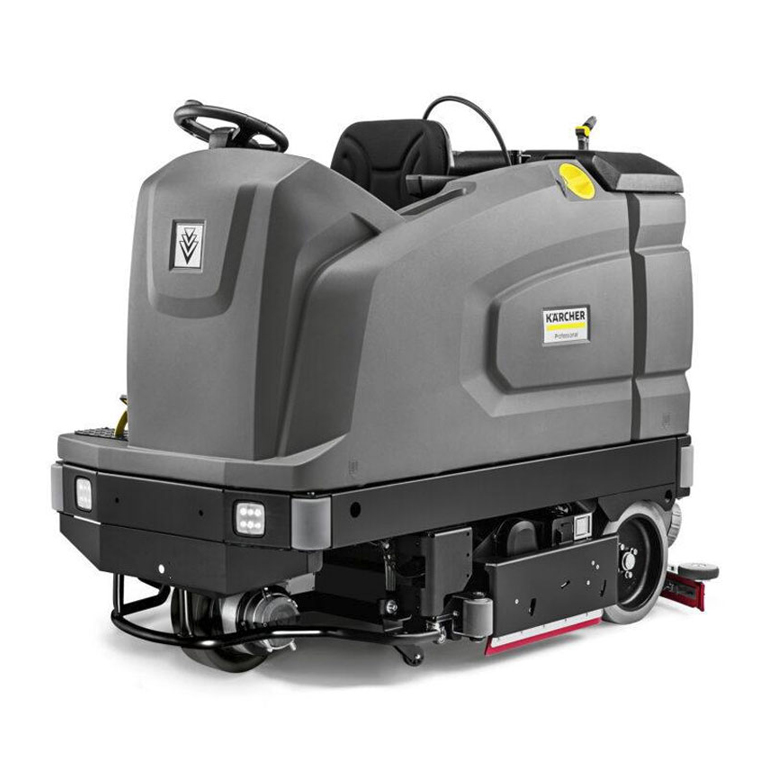
It is ideally suited for even the most heavy duty industrial cleaning use cases, including applications across warehouses, factories, logistics buildings, distribution centres, production halls, and heavy industry sites.
Here at Alpha Power Cleaners, we have the B 260 RI available for hire and to buy direct – if you are interesting in our hire contracts, or want a sales quote, contact our team.
Jump to Fault Codes:
Karcher B 260 RI Floor Scrubber Dryer – Fault Codes
Need help? Contact our team for support on 0808 169 8529.
Fault Codes shown on the Display
| Fault | Instructions |
|---|---|
| Seat switch open! |
|
| Release the accelerator pedal! |
|
| No travel direction! |
|
| Battery discharged! |
|
| Battery voltage impermissible! |
|
| Fresh water tank empty! |
|
| Brush pressure not reached! |
|
| Waste water full! |
|
| Brake defective! |
|
| Driving motor too hot! (Cooling phase) |
|
| Horn defective! |
|
| Head CPU too hot! (Cooling phase) |
|
| Brush drive overloaded! |
|
| No travel direction! (Second instance) |
|
Faults not shown on the Display
Need help? Contact our team for support on 0808 169 8529.
| Fault | Instructions |
|---|---|
| The device cannot be started |
|
| The water quantity is insufficient |
|
| The suction performance is too low |
|
| The cleaning results are unsatisfactory |
|
| The brushes do not rotate |
|
| The optional all-round light and/or the working light do not light up |
|
| Error K1/109 |
|
These remedies can be attempted yourself, though if you have any problems, we are happy to help. For any fault codes now shown in this table, contact our team for support on 0808 169 8529.
At Alpha Power Cleaners, we provide servicing and repairs across our entire Karcher range to ensure downtime is kept to a minimum.
Accredited Karcher Premier Servicing Dealer.
This means that our team are trusted by Karcher, not only to supply their equipment, but to provide clients that have hired or purchased these machines with specialist servicing, maintaining and repair services.
Our skilled, trained team are also available to conduct repair and maintenance services on your Karcher machines, at a time and schedule that suits you.
By utilising these services, you can minimise the risk of machine faults (and so any associated downtime or delays), and maximise the return on your investment, by securing the longest possible lifespan for your Karcher B 260.
So, to find out more about commercial cleaning machines, or to arrange for the hire of a Karcher B 260 RI Floor Scrubber Dryer for your premises, don’t hesitate to get in touch.
We serve customers across the South of England, West Midlands and East Midlands, including Nottingham, Derby and Loughborough.
Get in touch with our team for machine hire, sales, service and repairs.